
At Stealthium, we build GPU introspection tools that peer into the deepest layers of GPU execution. To do that effectively, we need to understand exactly how GPU code makes its way from source to silicon. This blog series explores the internals of CUDA's runtime infrastructure, starting with one of its most critical, yet poorly documented, components: the fatbin format.
When compiling a CUDA program with nvcc, it doesn't create a simple executable, but instead something more complex. A standard CPU binary, commonly referred to as the host binary, that carries embedded GPU code, potentially multiple versions of the same code, each optimised for different architectures.
Most developers know fatbins exist. They understand the basic promise outlined in NVIDIA's binary utilities documentation: compile once, run on multiple GPU architectures through a combination of pre-compiled binaries (cubins) and portable assembly (PTX). But the internal structure? The security implications? The runtime behavior? That's where NVIDIA's documentation ends and reverse engineering begins.
Two Runtimes, Two Philosophies
Before diving into fatbin internals, it's worth understanding CUDA's split personality. NVIDIA provides two distinct APIs, as detailed in the CUDA programming guide:
libcudart (CUDA Runtime API): The high-level, automatic interface most developers use. When you write cudaMalloc() or launch a kernel with <<<>>> syntax, you're using the runtime. It handles context management, automatic fatbin loading, and makes CUDA feel "batteries included."
libcuda (CUDA Driver API): The low-level, explicit interface that provides direct control over the driver. This is the API that libcudart ultimately calls underneath. It exposes primitives such as cuMemAlloc(), cuModuleLoadData(), and requires the application to manually manage contexts, modules, and other resources.
At Stealthium, we generally prefer introspecting the latter. The Driver API is driver-specific, represents the actual boundary that communicates with the NVIDIA driver, and is always dynamically loaded by CUDA applications. In contrast, libcudart may be statically linked into applications, making it significantly harder to intercept reliably across all CUDA workloads.
Anatomy of a CUDA Application
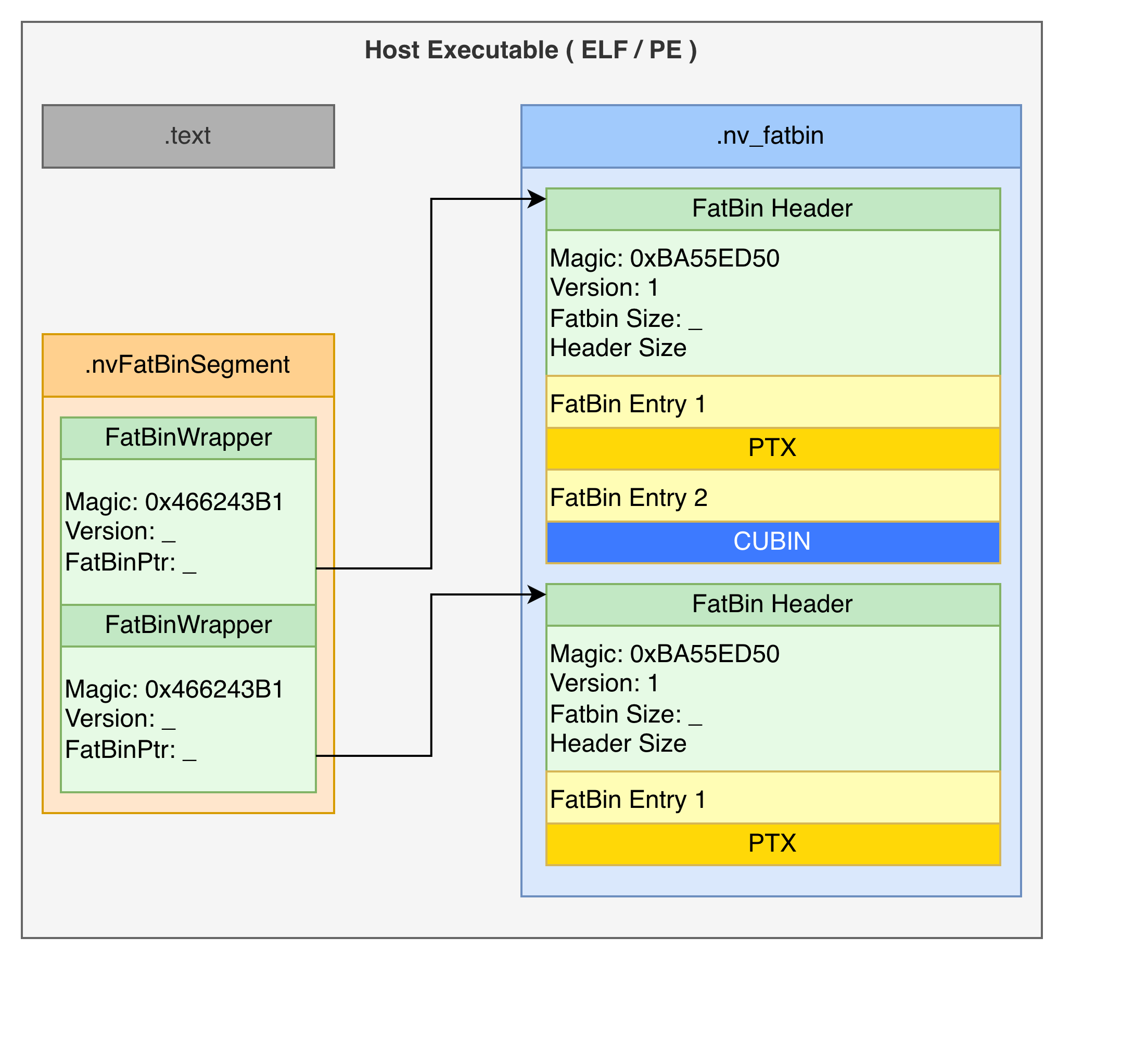
The outermost layer is standard CPU machine code (ELF or PE), nowadays this is typically either a x86-64 or ARM executable. Embedded within this executable, typically in a section called .nv_fatbin, sits all fat binaries within this CUDA application. An array in .nvFatBinSegment points to the start of all the fat binaries in the application.
$ readelf -S a.out | grep -i fatbin
  [18] .nv_fatbin        PROGBITS         0000000000089cc8  00089cc8
  [29] .nvFatBinSegment  PROGBITS         00000000000a8058  000a8058
Layer 1: The Fat Binary List
We are not the first to reverse engineer this format. Over the years public projects, such as Clang and ZLUDA refer to this initial layer as the fat bin wrapper.
struct FatBinPtr {
    int32_t magic;         // 'FbC\xb1' - Your first clue this is CUDA
    int32_t version;
    void* fatbin_data;     // Pointer to the real payload
    char* filename_or_bin;
};
Taking a look at a simple hello world, we have the following content in the .nvFatBinSegment:
struct FatBinWrapper __fatDeviceText[0x2] =
{
    [0x0] =
    {
        int32_t magic = 'FbC\xb1'
        int32_t version = 0x2
        void* fatbin_data = 0x00489cc8
        char* filename_or_bin = 0x004a80b0
    }
    [0x1] =
    {
        int32_t magic = 'FbC\xb1'
        int32_t version = 0x1
        void* fatbin_data = 0x0048a010
        char* filename_or_bin = 0x0
    }
};
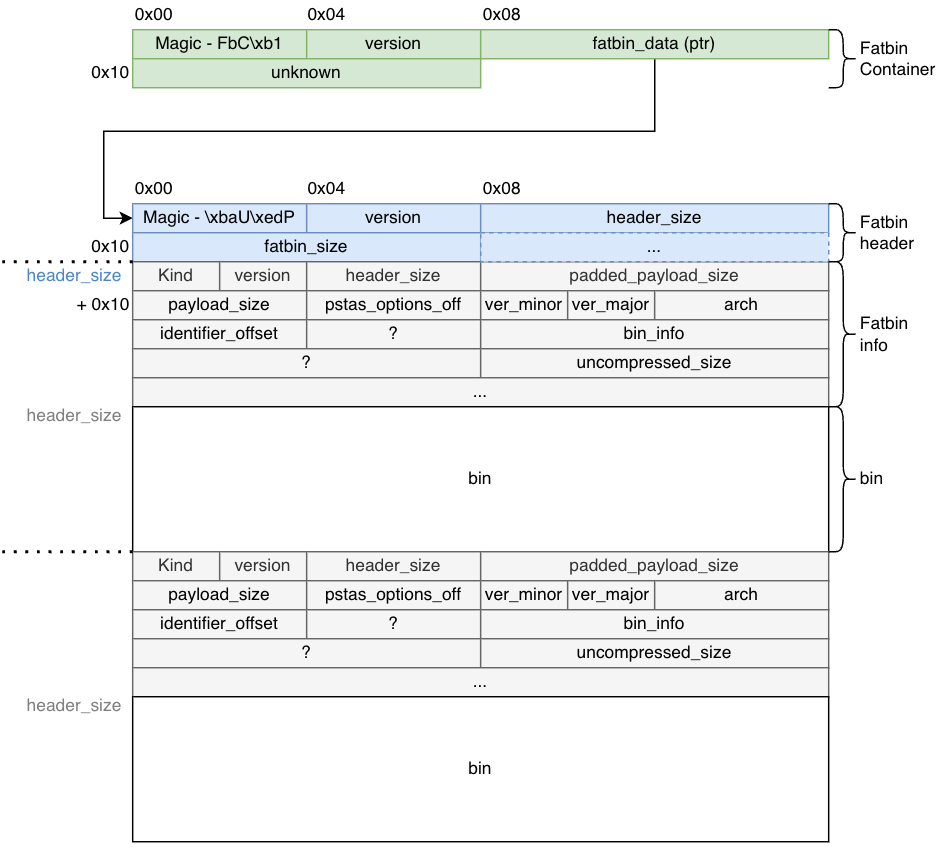
That magic number FbC\xb1 is your first confirmation you're looking at CUDA's binary format, or at least a pointer to it. The pointer at offset 0x08 leads to the actual fatbin data — this is the entry point structure that lives in your executable's .nv_fatbin section.
Layer 2: The FatBin Header
Following that pointer, you reach the proper FatBin. The header magic 0xBA55ED50 appears in various reverse-engineering projects and has become the signature of CUDA fatbins:
struct FatBinHeader {
    uint32_t magic;       // 0xBA55ED50 - Second magic number
    uint16_t version;     // Currently 1
    uint16_t header_size; // Critical for parsing
    uint64_t fatbin_size; // Total size of all contained binaries
};
The header_size tells you where the actual binary entries begin, while fatbin_size tells you when to stop parsing. Between them lies a sequence of entries, each describing a different GPU binary.
Layer 3: FatBin Entries
Each entry in the fatbin describes one GPU binary. While the basic entry structure has been partially documented by the community, we've filled the 66-byte structure with our own findings through our reverse engineering work:
struct FatBinEntry {
    enum FatBinKind kind;             // PTX (0x1) or ELF (0x2)
    uint16_t version;                 // 0x101
    int32_t header_size;              // Size of this entry's header
    int64_t padded_payload_size;      // Payload size with alignment
    int32_t payload_size;             // Actual payload size
    int32_t ptxas_options_offset;      // Compiler options offset
    uint16_t code_version_minor;      // CUDA toolkit minor version
    uint16_t code_version_major;      // CUDA toolkit major version (e.g., 9, 12, 13)
    uint32_t arch;                    // GPU architecture (SM version)
    uint32_t identifier_offset;       // Offset to binary name string
    uint32_t field_24;                // Undocumented
    enum BinInfo bin_info;            // Platform and compression flags
    uint64_t field_30;                // Undocumented
    uint64_t uncompressed_payload;    // Original size if compressed
};
The kind field tells you what follows: either PTX (portable assembly) or ELF (architecture-specific binary). The arch field specifies the target GPU compute capability (like SM_52 for Maxwell, SM_86 for Ampere, SM_89 for Ada Lovelace).
It's worth noting that the entry's header may be bigger than 66 bytes depending on the value indicated by header_size.
The bin_info field is particularly interesting — it's a bitfield we've documented that encodes platform, debug information, and compression method:
enum BinInfo : uint64_t {
    _64Bit = 0x1,
    HasDebugInfo = 0x2,
    Linux = 0x10,
    Mac = 0x20,
    Windows = 0x40,
    ZLIBCompression = 0x1000,
    LZ4Compression = 0x2000,
    LZ4Compression2 = 0x4000,
    ZSTDCompression = 0x8000
};
Fatbin payloads can be compressed using standard algorithms (ZLIB, LZ4, ZSTD). The driver will decompress them before loading. Current versions of CUDA (13+) seem to exclusively use ZSTD compression. While PTX appears to always be compressed, ELF binaries seem to need to reach a certain size threshold before compression is applied.
Parsing the Structure
Parsing proceeds sequentially through the FatBin by reading each entry's metadata from the info structures, then advancing by the padded_payload_size to reach the next entry. This continues until the cumulative size equals the total fatbin_size specified in the header, ensuring all PTX files, cubin files for various GPU architectures, and other binary formats are correctly extracted.
This pointer-based navigation is efficient but fragile — there's no built-in error correction, and malformed entries can cause parsing failures.
The Two Types of GPU Code
A fatbin typically contains two kinds of GPU code, each serving a different purpose as explained in NVIDIA's PTX documentation:
Cubins (ELF-CUDA Binaries)
These are pre-compiled, architecture-specific binaries — the GPU equivalent of native machine code. Each cubin is an ELF file with NVIDIA-specific markers.
These binaries can be read using standard tools such as readelf:
$ readelf -h tmpxft_00005648_00000000-1.sm_52.cubin
ELF Header:
  Magic:   7f 45 4c 46 02 01 01 33 07 00 00 00 00 00 00 00
  Class:                             ELF64
  Data:                              2's complement, little endian
  Version:                           1 (current)
  OS/ABI:                            <unknown: 33>
  ABI Version:                       7
  Type:                              EXEC (Executable file)
  Machine:                           NVIDIA CUDA architecture
  Version:                           0x78
  Entry point address:               0x0
  Start of program headers:          3320 (bytes into file)
  Start of section headers:          2424 (bytes into file)
  Flags:                             0x340534
  Size of this header:               64 (bytes)
  Size of program headers:           56 (bytes)
  Number of program headers:         4
  Size of section headers:           64 (bytes)
  Number of section headers:         14
  Section header string table index: 1
Exact official meaning of these values does not exist, but by comparing different binaries built for different platforms, we can extract some meaning out of these:
- CUDA 12:
- OS/ABI: 0x33
- ABI Version: 7
- GPU Architecture: encoded in LSB of flags (e.g., 0x46055A → 0x5A = 90 = sm_90)
- CUDA 13:
- OS/ABI: 0x41
- ABI Version: 8
- GPU Architecture: encoded in 2nd LSB of flags (e.g., 0x6007802 → 78 = 120 = sm_120)
When the driver finds a cubin matching the current GPU's compute capability, it can load and execute it directly — no just-in-time compilation needed.
It is worth noting that the decoded EI_OSABI values are speculative from our own observation when compiling different programs with different toolkit versions; this is by no means a "standard."
Kernel Organization in Cubins
Unlike typical CPU executables that consolidate code into a single .text section, cubins split each kernel into its own section in the ELF binary. You can observe this with readelf:
$ readelf -s a.2.sm_120.cubin | grep FUNC
    13: 0000000000000000   512 FUNC    GLOBAL DEFAULT [<other>: 10]    15 _Z10cuda_helloi
    14: 0000000000000000     0 FUNC    GLOBAL DEFAULT  UND vprintf
    15: 0000000000000000   384 FUNC    GLOBAL DEFAULT [<other>: 10]    16 _Z10cuda_hellov
This per-kernel section organisation makes it significantly easier to fingerprint individual kernels when applications load pre-compiled cubins — a property we leverage extensively in our introspection platform.
PTX (Parallel Thread Execution)
PTX is CUDA's portable assembly language, a virtual ISA that provides forward compatibility. When your executable runs on a GPU newer than those targeted at compile time, the driver JIT-compiles PTX to native SASS (the actual GPU assembly instruction set).
PTX entries in the fatbin include version information and function definitions. They're text-based (though often compressed in the fatbin), making them somewhat inspectable even without specialised tools. You can extract and view PTX code using cuobjdump:
$ cuobjdump --dump-ptx my_executable
Runtime Loading: What Actually Happens
When a CUDA program runs, the driver (libcuda.so) must load these binaries before any kernels execute. This happens through the module API, primarily cuModuleLoadData():
CUresult cuModuleLoadData(CUmodule *module, const void *image);
The image parameter typically points to either a FatBinWrapper or a raw CUBIN. At a relatively high level, the driver does the following:
- Parse the fatbin structure: Read the FatBinContainer, follow pointers to the FatBin header, iterate through entries
- Enumerate visible GPUs: Check which devices exist in the current context
- Select best binaries: For each GPU, prefer a cubin with matching SM version; fall back to PTX if no match exists
- JIT compile if needed: If using PTX, compile it to SASS for the target architecture
- Load and link: Place the code in GPU memory, resolve symbols (kernels, global variables)
- Return handle: Give the application a
CUmodulehandle for launching kernels
Symbol resolution can be lazy — not all kernels need to be loaded immediately, only those actually invoked. This reduces startup time but adds latency to the first call of each kernel.
The Security Question Nobody's Asking
Here's where things get interesting from a security perspective and where we enter uncharted territory. While the security community has explored GPU-based malware that uses GPUs for unpacking or encryption (Vasiliadis et al., 2010), no published research has examined the risk of architecture-specific malicious payloads within fatbins.
A fatbin can contain multiple binaries for different architectures. The format itself provides no cryptographic verification, no signature checking, no integrity guarantees. There's nothing preventing a fatbin from containing:
- Legitimate code for SM_80 (A100 GPUs)
- Malicious code for SM_89 (L40 GPUs)
- Different behaviour for SM_86 (RTX 3090) versus SM_90 (H100)
The driver will happily load whichever binary matches your hardware. Unless you're extracting and inspecting each architecture-specific payload individually, you have no way to know if they behave identically.
This isn't a theoretical concern. Consider:
Cryptocurrency mining: Production inference code on most GPUs, mining malware activated only on high-end datacenter GPUs (H100, A100) where the hash rate makes it worthwhile.
Data exfiltration: Benign behaviour on development systems with consumer GPUs, data theft triggered only on production deployments with specific datacenter hardware.
IP theft: Different algorithm implementations depending on detected architecture, making reverse engineering harder — benign reference implementations on common GPUs, proprietary algorithms on specific targets.
Supply chain attacks: Compromised ML model checkpoints or pre-compiled CUDA libraries that behave differently based on which GPU architecture loads them.
The lack of visibility into GPU binaries creates a blind spot in security tooling. Traditional endpoint security solutions can inspect CPU code but have no mechanism to examine GPU binaries. Even if you decompile the CPU portion of a CUDA executable, you won't see what's inside the fatbins without specialised parsing — and even then, you need to extract and analyse every architecture variant to ensure consistency.
This architecture-specific targeting capability has no equivalent in CPU malware, where binaries are architecture-specific by necessity. The fatbin format's multi-architecture support, designed for compatibility, inadvertently creates an attack surface.
Stealthium's Approach: Visibility Through Introspection
This is precisely why we built Stealthium's GPU introspection platform. We use eBPF uprobes to intercept several CUDA-related APIs in real-time — this includes cuModuleLoadData() — capturing:
- The complete fatbin being loaded
- Process context (PID, executable path, command line)
- All contained binaries (both PTX and cubins for every architecture)
- Hashes of individual kernels within each binary
- Architecture targets and CUDA toolkit versions
- Compression methods and binary metadata
Looking at a real example. When Ollama loads a model, our agent generates hyperprints for each of the modules loaded, with the one below being an example:
{
	"type": "CudaLibraryLoad",
	"ts": 1768862950100683300,
	"data": {
		"pid": 25832,
		"load_error": 0,
		"hash": {
			"algorithm": "BLAKE3",
			"value": [
				5, 254, 167, 26, 114, 250, 12, 16, 120, 133, 255, 202, 59, 195, 155, 124, 188, 185, 255, 237, 94, 56, 71, 240, 194, 46, 227,
				97, 136, 65, 104, 157
			]
		},
		"data_type": "FatBinContainer",
		"data": {
			"version": 1,
			"entries": [
				{
					"bin_info": 32785,
					"payload_size": 26088,
					"uncompressed_size": 186562,
					"payload_type": "NONE",
					"hash": {
						"algorithm": "BLAKE3",
						"value": [
							85, 65, 243, 98, 28, 249, 140, 27, 93, 11, 176, 38, 29, 6, 16, 140, 195, 123, 202, 168, 73, 209, 114, 213, 34, 214, 28,
							211, 11, 119, 148, 168
						]
					},
					"arch": 75,
					"kind": 1,
					"shallow": true
				},
				{
					"bin_info": 32785,
					"payload_size": 26088,
					"uncompressed_size": 186562,
					"payload_type": "NONE",
					"hash": {
						"algorithm": "BLAKE3",
						"value": [
							238, 121, 227, 134, 59, 182, 251, 209, 89, 72, 41, 246, 242, 196, 213, 198, 54, 81, 252, 65, 45, 217, 129, 11, 81, 206,
							221, 79, 85, 76, 193, 157
						]
					},
					"arch": 80,
					"kind": 1,
					"shallow": true
				},
				{
					"bin_info": 32785,
					"payload_size": 26088,
					"uncompressed_size": 186562,
					"payload_type": "CudaPtx",
					"payload": {
						"version_major": 9,
						"version_minor": 0,
						"target": "sm86",
						"functions": [
							{
								"name": "_Z8norm_f32ILi32EEvPKfPfilllf",
								"size": 6831,
								"hash": {
									"algorithm": "BLAKE3",
									"value": [
										82, 100, 101, 28, 241, 170, 91, 95, 96, 223, 104, 77, 8, 194, 199, 180, 43, 194, 232, 217, 139, 175, 212, 102, 211,
										73, 160, 39, 199, 118, 36, 102
									]
								}
							},
							{
								"name": "_Z8norm_f32ILi1024EEvPKfPfilllf",
								"size": 8333,
								"hash": {
									"algorithm": "BLAKE3",
									"value": [
										209, 59, 117, 215, 225, 3, 125, 200, 212, 192, 229, 181, 195, 51, 90, 74, 201, 4, 58, 76, 41, 116, 67, 8, 56, 217,
										15, 139, 168, 232, 216, 150
									]
								}
							}
						]
					},
					"arch": 86,
					"kind": 1,
					"shallow": false
				}
			]
		}
	}
}
This gives us:
Binary-level tracking: Every fatbin loaded gets a unique fingerprint. We can track provenance across deployments.
Kernel-level visibility: Individual functions can be identified and tracked. We hash each kernel's binary code, enabling detection of modified implementations.
Architecture coverage: We see exactly which GPU targets are included. Missing or unexpected architectures can trigger alerts.
Cross-architecture validation: We can compare hashes across different architecture variants of the same kernel to detect inconsistencies.
When the same fatbin appears on multiple systems, we know it. When a fatbin contains architecture-specific differences in kernel implementations, we can detect it. When unexpected GPU code loads in production, we alert on it.
Beyond the Basics: Dynamic Loading
Most fatbins are statically embedded in executables during compilation, residing in the .nv_fatbin section of the host binary. But we've observed applications — particularly Ollama — dynamically loading cubins (ELF binaries) rather than fatbins through cuModuleLoadData(). When we analysed these occurrences, the binaries were located on the heap of the program at runtime, never appearing in the executable's static sections.
This dynamic loading complicates security analysis. It's not enough to scan executables at rest — you need runtime visibility into what GPU code actually executes. Static analysis tools that only examine the .nv_fatbin section will miss dynamically loaded code entirely.
Our eBPF-based approach catches both static and dynamic loading paths, since we intercept at the driver API level where all code must eventually pass.
What's Next
This post covered the structure of fatbins and the basics of how they're loaded. In the next instalment, we'll dive into kernel launching: how cuLaunchKernel() works internally, how we trace kernel executions efficiently (Ollama generates over 10,000 kernel launches per inference!), and what you can learn from kernel call patterns.
We'll also explore the opaque handle types NVIDIA uses (CUfunction, CUmodule, CUcontext) and how we extract metadata from them despite the lack of public documentation.